Names & Biographical Data
- How to add yourself to IMDb
- How do I add a biography?
- How can I delete or update my biography?
- Biographical Data Guidelines
- Names
- How can I combine two IMDb name pages?
- Alternate names (AKAs)
- How do I change my name?
- My name was spelled incorrectly. Can you fix it?
- Manage the display of your alternate name(s)
- Manage the display of your birth name
- I know there is only one John Smith registered with SAG. How do I delete the other IMDb pages?
- Links to external sites for Names
Manage the display of your birth name
IMDbPro members (IMDbPro Premium Subscription and IMDbPro Basic Subscription) with a claimed name page can control the display of their birth name from the About tab by using the Edit information button located at the bottom of this IMDbPro page. When a user chooses not to display their birth name, the name will no longer be searchable.
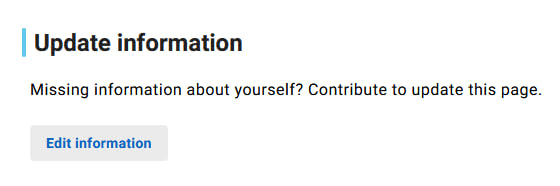
- Go to your IMDbPro page
- From the About tab, scroll to the bottom of the page
- Select the Edit information button
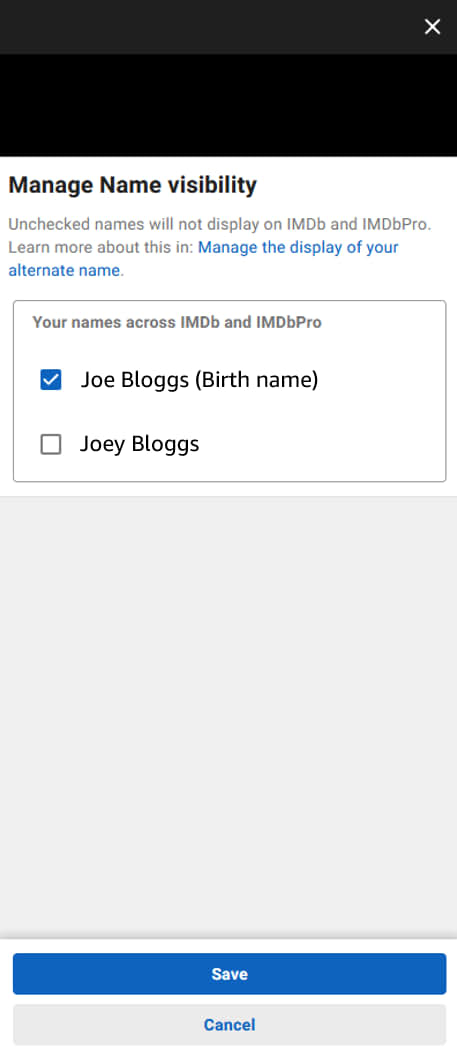
- Under Biographical details, select Manage alternate names
- Manage your Name visibility by checking/unchecking your Birth name
- Checked = Displayed on IMDb and IMDbPro
- Unchecked = Not Displayed on IMDb and IMDbPro
- Select Save
Learn more about all of the benefits, tools, and services available to IMDbPro members. Join today with a 30-day free trial.
Did this answer your question?
Thank you! We’d love to hear more about your experience. Please help us improve by taking this 2 minute survey.
Thank you! We’d love to hear more about your experience. Please help us improve by taking this 2 minute survey.
Thank you! We’d love to hear more about your experience. Please help us improve by taking this 2 minute survey.
Back to top