- What is IMDb?
- Use your Amazon account for IMDb
- Why should I register on IMDb?
- Site Preferences
- Email Preferences
- Manage Your Email Subscriptions and Watchlist Notifications
- IMDb Site Index
- Why do I need to enable my cookies on IMDb?
- How can I access or delete personal information IMDb stores about me?
- How do I update my email address?
- Sign in with Facebook not available
- How can I delete my IMDb account?
- How can I request my IMDb account data?
- Sign-in issues
- IMDb Single Sign-On with Amazon
- Trouble Signing in to IMDb (Browser is Redirecting on Device)
- Use of Amazon Japan accounts (Amazon.co.jp accounts) on IMDb
- Use of Amazon accounts registered in China on IMDb
- IMDb Support Community access - You're about to leave IMDb.com
- How to effectively report problems
- How to report security issues and vulnerabilities
- How to report suspicious emails
- What's your phone number?
- IMDb Text Formatting
- How do I link to a specific page on your site?
- Where does the information on IMDb come from?
- Can I use IMDb data in my software?
- Can I use your data in a book/website/magazine?
- Can I use a photo or video from your site for my web site or publication?
- Digital Services Act Information
- What's the difference between an IMDb page and user profile?
- FAQ for the "Your Profile" feature
- How do I report IMDb user profile content?
- Is my IMDb Profile page private?
- User naming - Username, Real name, IMDb page
- How can I change my Username?
- How can I upload an image to my "Your Profile" page?
- FAQ for the ‘Recently Viewed’ feature
- You have so much information! Where should I start?
- How much does using IMDb cost?
- What is the difference between IMDb and IMDbPro?
- How do I break into show business?
- Can you help me contact a celebrity listed on IMDb?
- Can you get rid of the ads on your site?
- What is an Enhanced Page?
- How can I personalize my advertising settings?
- Why do I need to enter a Captcha?
- Boards Closure FAQ
- What software are you using to run IMDb?
- Hammer Software License
- IMDb Partners
- Advertise on IMDb
- Introducing the IMDb API!
- Content licensing
- Press information
Use your Amazon account for IMDb
Updated 27-October-2026
IMDb is an Amazon company. This article explains how IMDb uses Amazon's account system and how, you as an Amazon customer, may be signed in to IMDb with your Amazon account. This applies to IMDb.com and the IMDb iOS and Android apps. Already using "Sign in with Amazon" to access IMDb? You're all set. Keep signing in the same way!
Contents
- What's changing?
- Why did we make this update?
- Find your IMDb experience (quick links)
- Troubleshooting / FAQs
- What happens after I migrate my account to Amazon?
- What happens if I don't migrate?
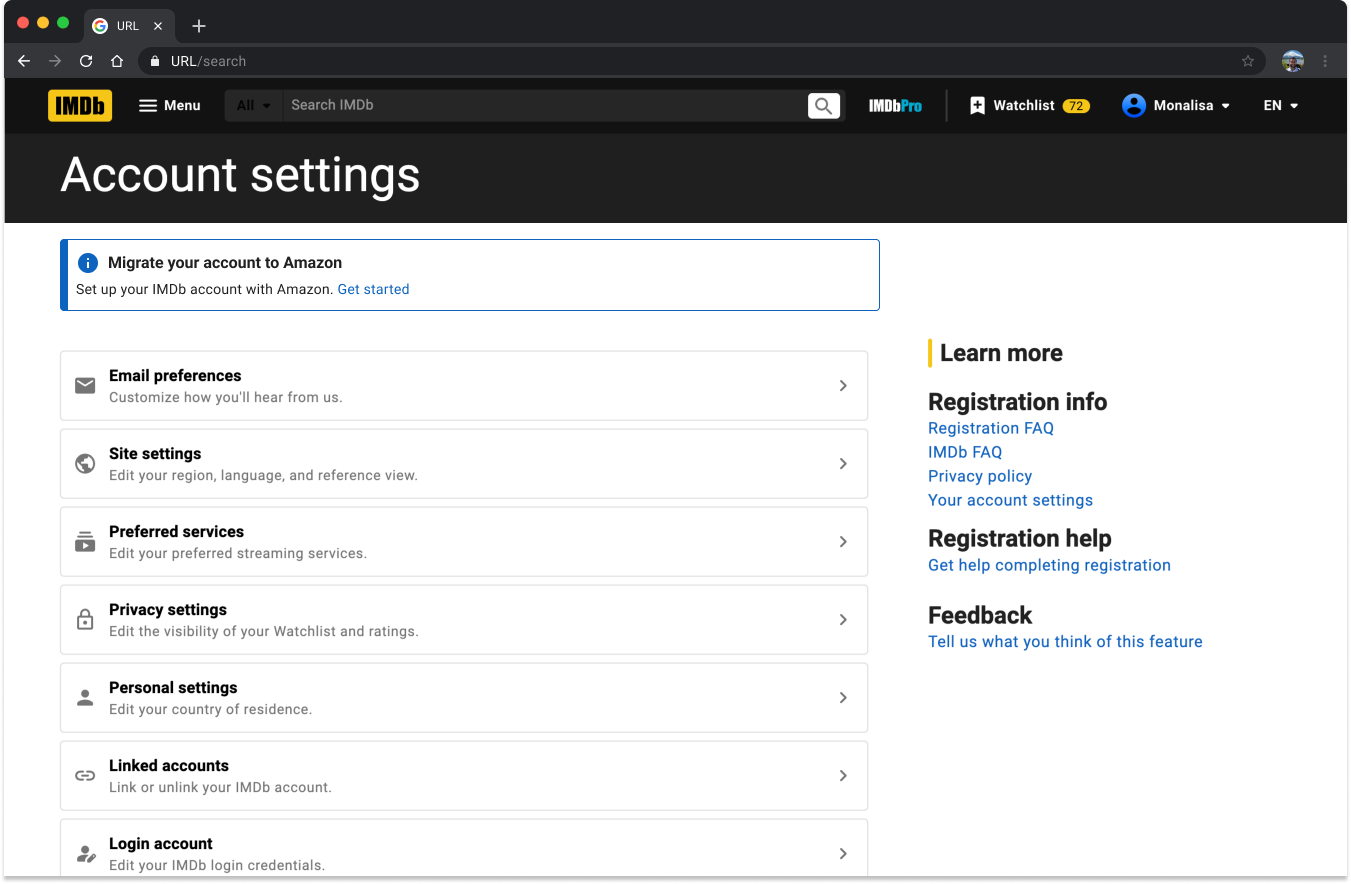
- Migrate via IMDb Account Settings
- Related help (quick links)
What's changing?
IMDb uses Amazon's account system for sign-in and new account creation, on both IMDb.com and the IMDb iOS and Android apps. If you sign in with alternative methods, you will be prompted to migrate your account to sign in with Amazon going forward. In some cases, you may be automatically signed in with your Amazon account. To learn more, visit our guide.
What stays the same?
- Existing IMDb accounts remain active. If you choose not to migrate, you can continue signing in with your IMDb email and password. We'll remind you to migrate and sign in to IMDb with your Amazon credentials every 60 days.
- Your IMDb data stays with you Your ratings, Watchlist, reviews, and contribution history all remain on your account.
Why did we make this update?
- Consistency: The same sign-in and account across Amazon and IMDb.
- Simplicity: Fewer credentials to manage; use your existing Amazon account for a more seamless experience.
- Personalization: Better recommendations tailored to your taste.
Find your IMDb experience (select the option that best describes how you use IMDb)
- I sign in on the IMDb desktop site →
- I sign in on the IMDb mobile site →
- I sign in on the IMDb iOS app →
- I sign in on the IMDb Android app →
- I sign in with Google or Apple →
- I'm new to IMDb →
Troubleshooting / Frequently Asked Questions
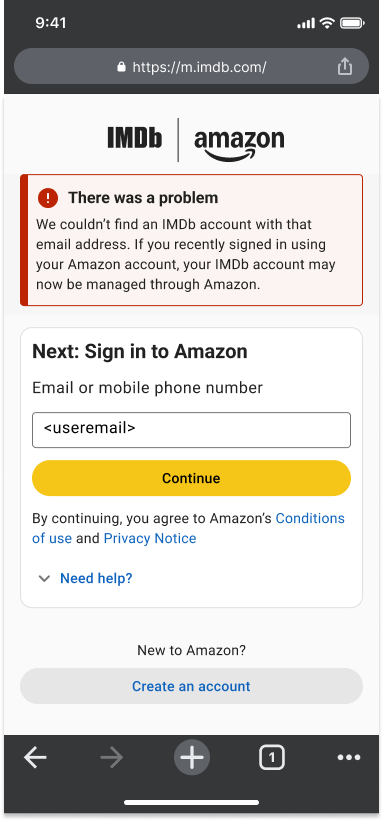
You couldn't find an IMDb account with my email address!
If you try to sign in to IMDb with Apple or Google after you've migrated your account to Amazon, you may see a "There was a problem" error when trying to sign in to IMDb. Your IMDb account is now managed with your Amazon credentials. Use these to sign in to IMDb by selecting Continue with Amazon.

My Amazon account is already in use!
If you see the below screen when trying to migrate your IMDb account to Amazon, continue with your IMDb account and try migrating with a different Amazon email address. This can be done from your IMDb Account Settings.

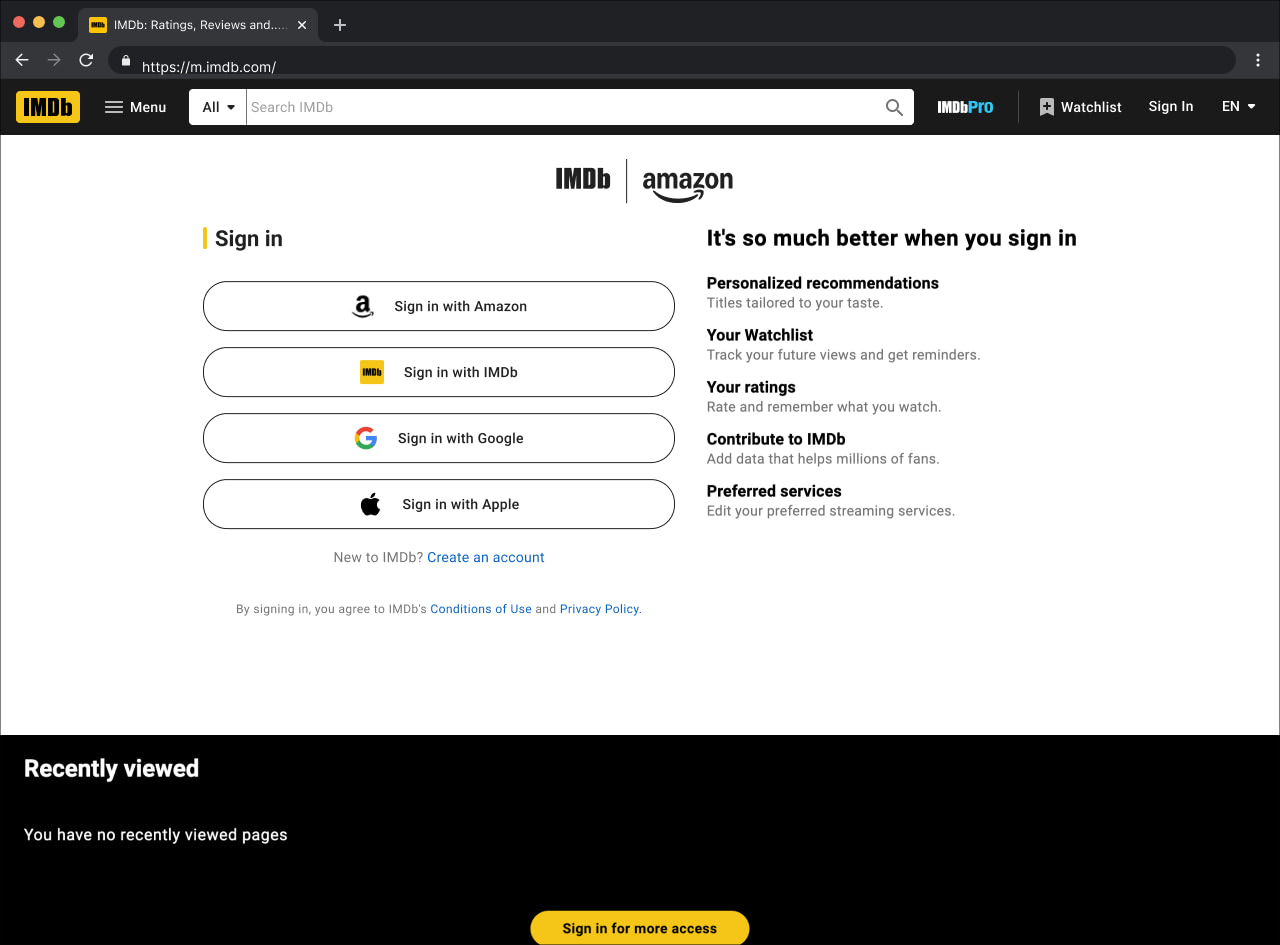
I'm not sure which sign-in method I used!
Try your most recent sign-in method first. If that doesn't work, try another option on the sign-in page.
My email changed on Amazon, how do I sign in?
If you changed your email on Amazon, your IMDb sign-in updates on its own. Sign in with your updated Amazon credentials.
My email changed on IMDb (before I tried to migrate), how do I migrate my account?
If you changed your IMDb email before migrating your account to Amazon, use your most recent IMDb email and password to start, and follow the steps from your preferred IMDb experience below (e.g. desktop, mobile site, iOS, Android, Google/Apple).
Do I need to create a new account?
No, you'll need to sign in to your existing IMDb account to migrate. This way you won't lose any user data or contribution history on your IMDb account. Follow the steps from your preferred IMDb experience below to sign in (e.g. desktop, mobile site, iOS, Android, Google/Apple).
What happens after I migrate my account to Amazon?
All of your IMDb data stays with you, but now you have the seamless experience of the same sign-in credentials and account across Amazon and IMDb. Just make sure to use your Amazon credentials when signing in to IMDb going forward!
You will now manage your account email, mobile number, and password (with Two-Step Verification) via the Amazon account settings page: Amazon.com > Account & Lists > Account > Login & security.
⚠️ Important
Deleting your Amazon account also deletes your IMDb and IMDbPro account, and all associated data. This includes any active IMDbPro membership.
What happens if I don't migrate?
If you decline migration to Amazon, you can continue to sign in with your IMDb credentials, but you'll be prompted again after 60 days to migrate.
What if I continue not signed in?
If you use IMDb without signing in, you will miss out on features such as; ratings, your Watchlist, reviews, and more!
I keep getting stuck in a loop!
If you can sign in to IMDb, go to your Account Settings and try to migrate to Amazon from there. Check out our instructions below for more details.
I sign in on the IMDb desktop site
You may be asked to migrate your IMDb account to sign in with your Amazon account.
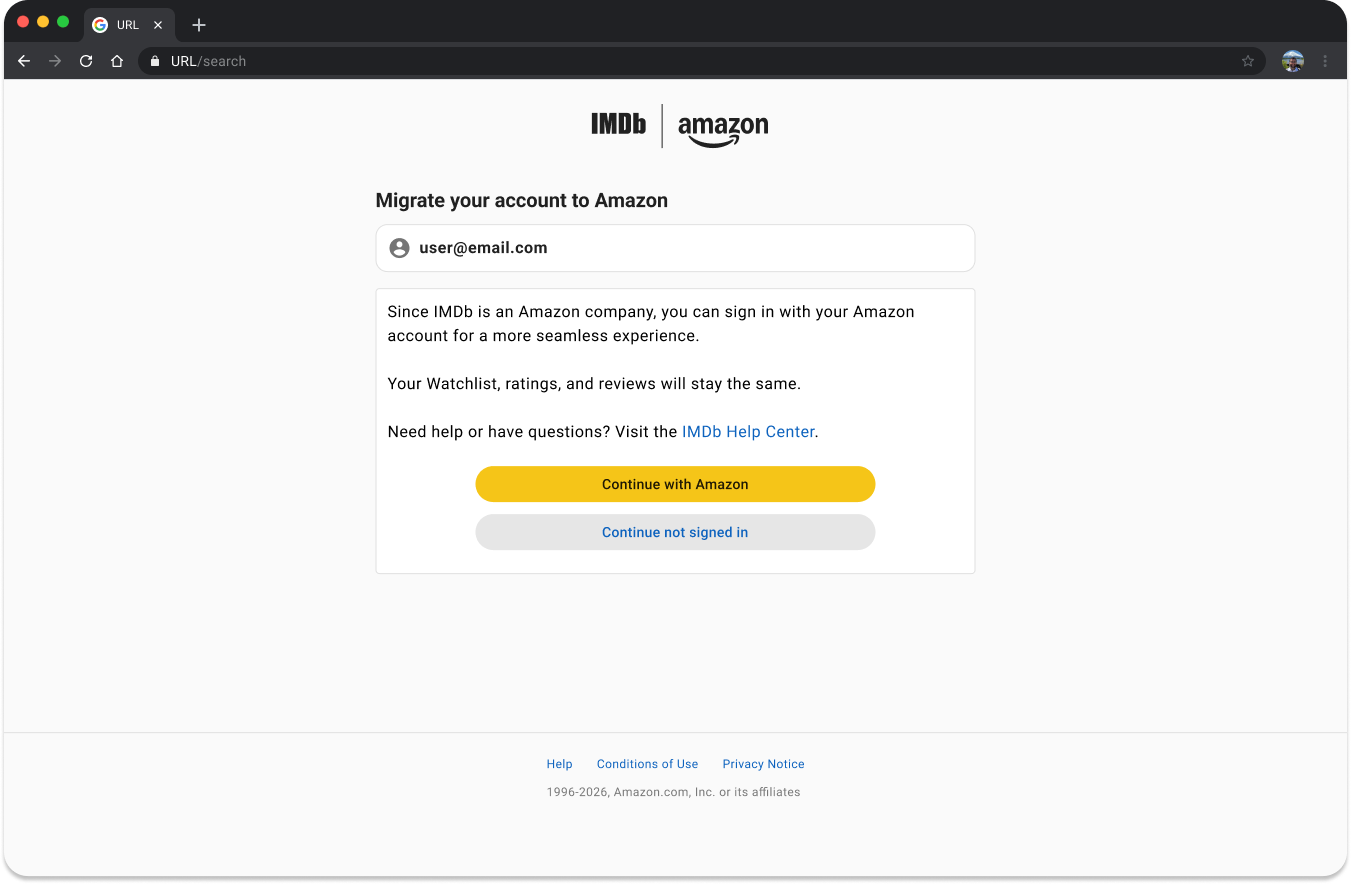
Here's what to expect:
- Sign in with your IMDb email and password.
- You'll see a message:
- Since IMDb is an Amazon company, you can sign in with your Amazon account for a more seamless experience. Your Watchlist, ratings, and reviews will stay the same.
- Confirm your IMDb account, then sign in to Amazon to complete migration.
- If you don't have an Amazon account, you can create one from the sign-in page.
- You're all set. From now on, use your Amazon account to sign in to IMDb.
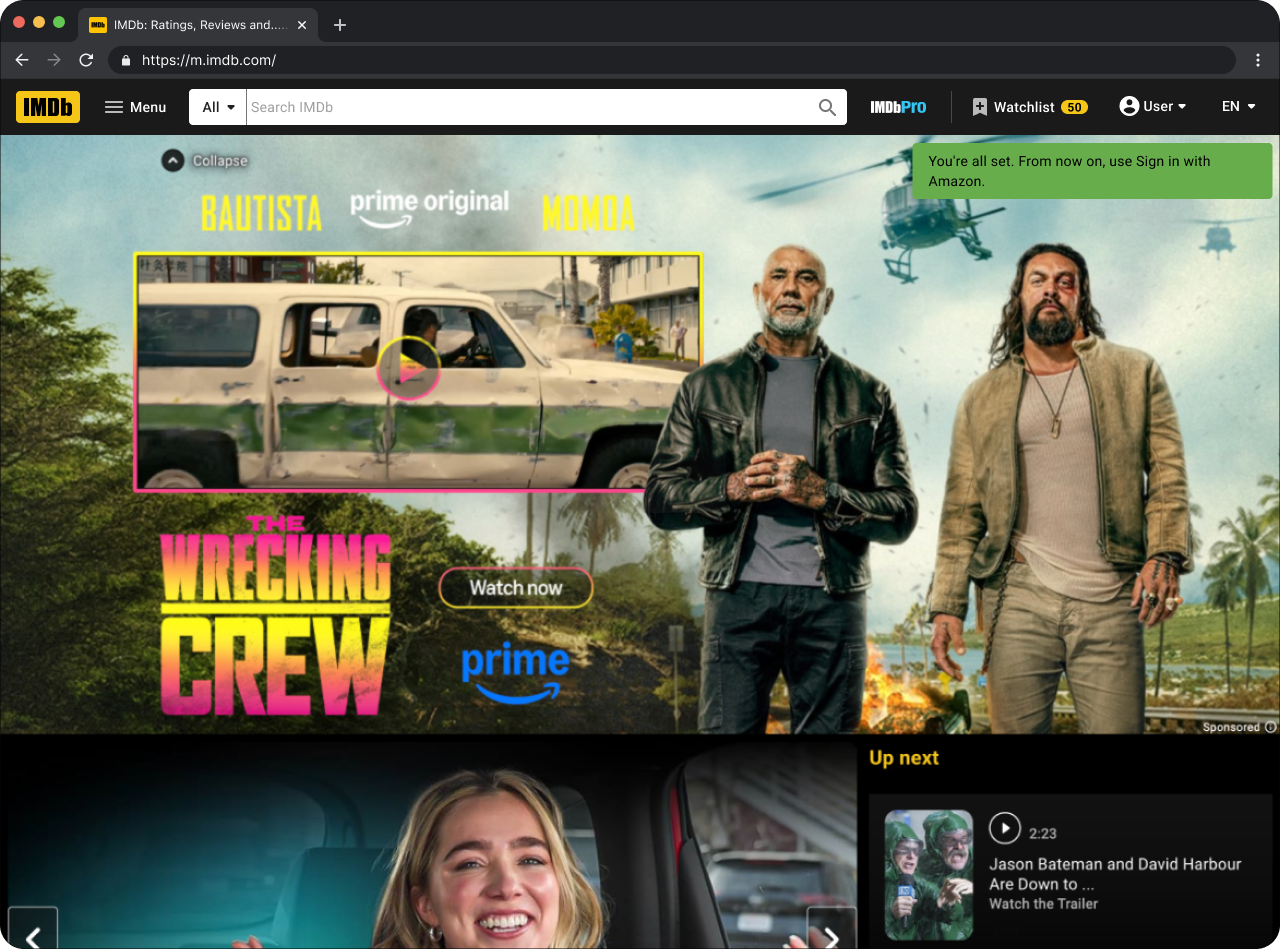
If you choose not to migrate your IMDb account, you will be prompted to do so after 60 days.
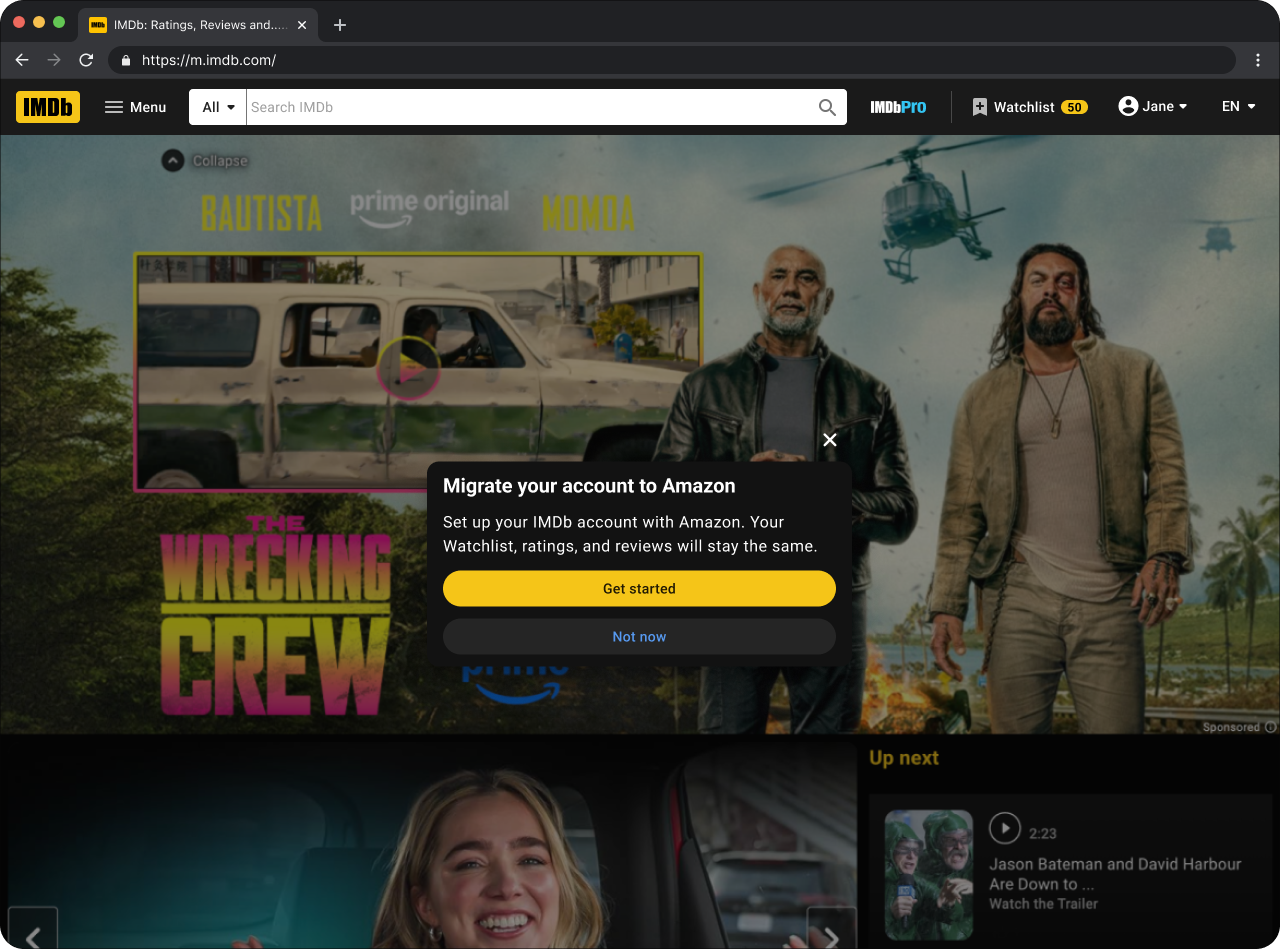
If you select Not now here, you can always migrate your IMDb account to Amazon from your Account Settings.
I sign in on the IMDb mobile site
If you use the IMDb mobile site, your experience will be the same as the desktop web steps above to migrate your account.
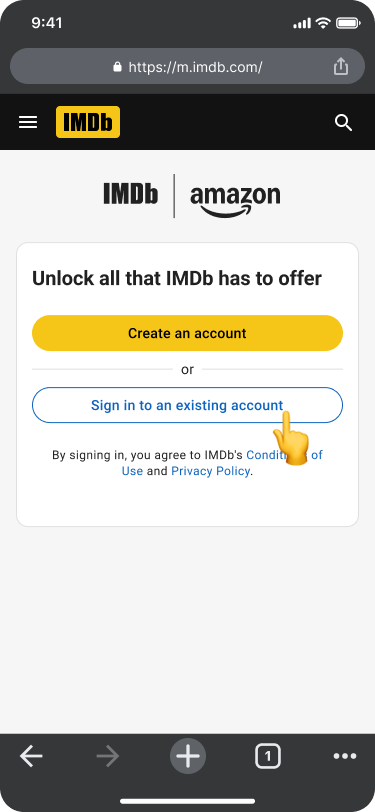
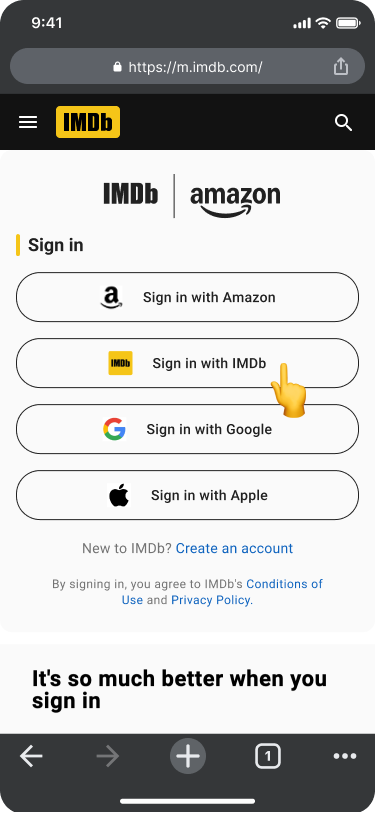
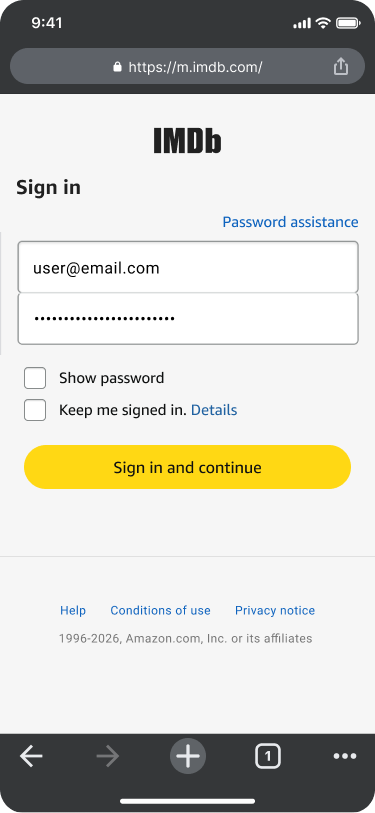


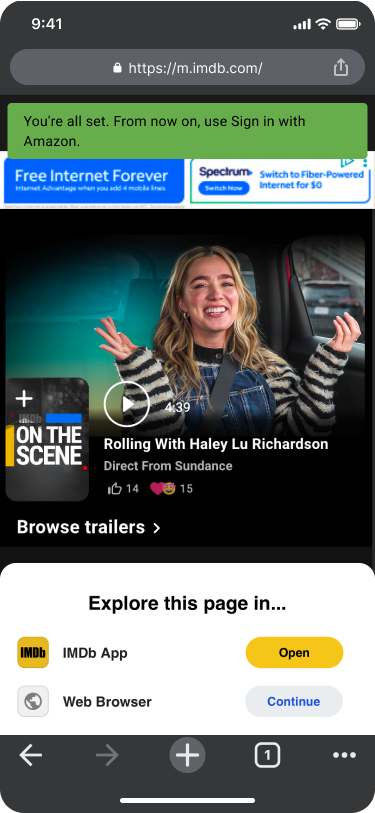
- Sign in to your existing IMDb account.
- Select Sign in with IMDb.
- Enter your IMDb account credentials.
- Migrate your account to Amazon? Next: Sign in to Amazon.
- Use your Amazon account email and password.
- You're all set. From now on, use Sign in with Amazon.
If you see that your Amazon account is already in use with another IMDb account, you'll have to continue with the IMDb account you've just signed in with. If you still want to migrate, try a different Amazon email address. You can do this from your IMDb Account Settings. If you're still experiencing issues migrating, or you can't sign in to IMDb to access your Account Settings, please Contact Us.
I sign in on the IMDb iOS app
These steps are the same as on IMDb desktop, but styled for the IMDb iOS app.
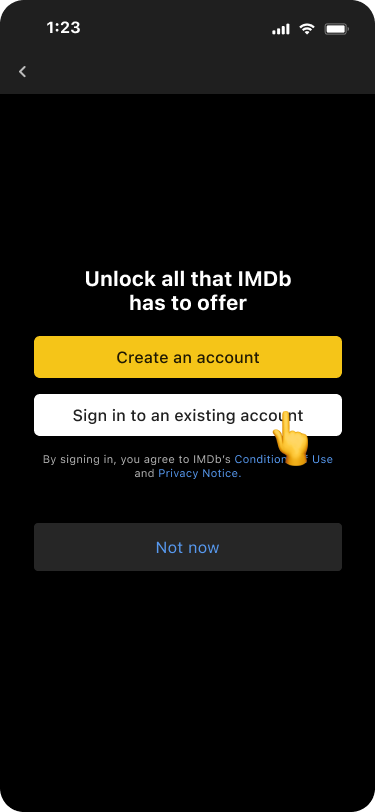
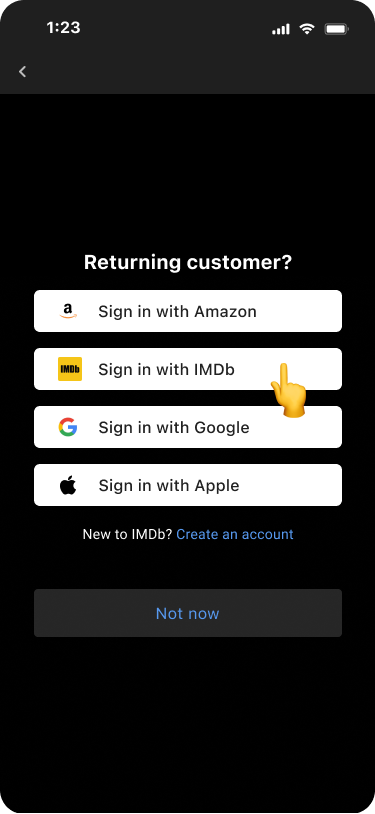
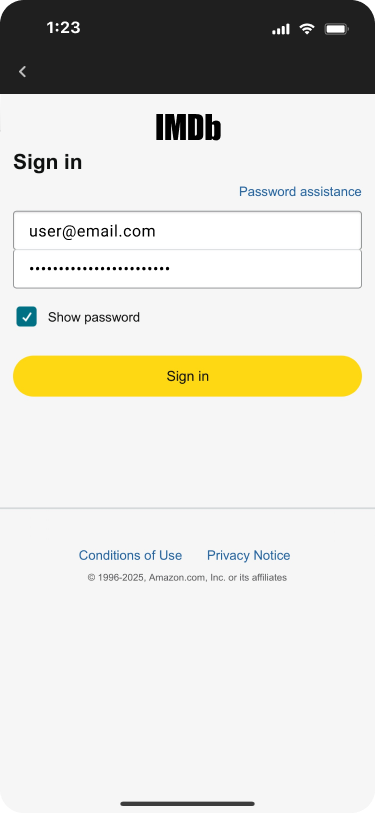


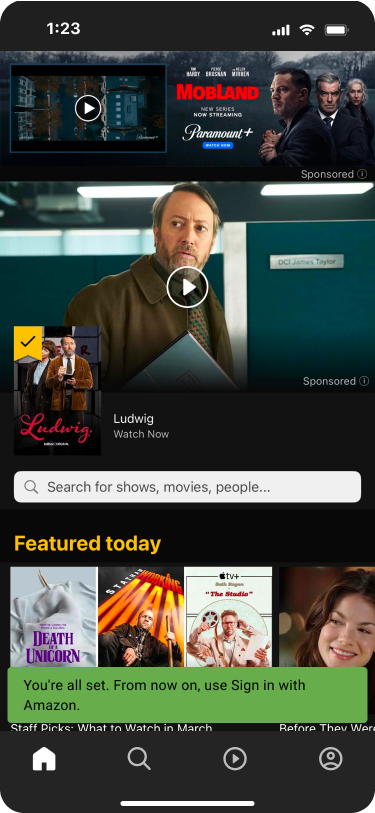
- On your IMDb iOS app, Sign in to your existing IMDb account.
- Select Sign in with IMDb.
- Enter your IMDb account credentials.
- Migrate your account to Amazon? Next: Sign in to Amazon.
- Use your Amazon account email and password.
- You're all set. From now on, use Sign in with Amazon.
If you see that your Amazon account is already in use with another IMDb account, you'll have to continue with the IMDb account you've just signed in with. If you still want to migrate, try a different Amazon email address. You can do this from your IMDb Account Settings. If you're still experiencing issues migrating, or you can't sign in to IMDb to access your Account Settings, please Contact Us.
I sign in on the IMDb Android app
The steps are the same as on IMDb desktop, but style for the IMDb Android app.
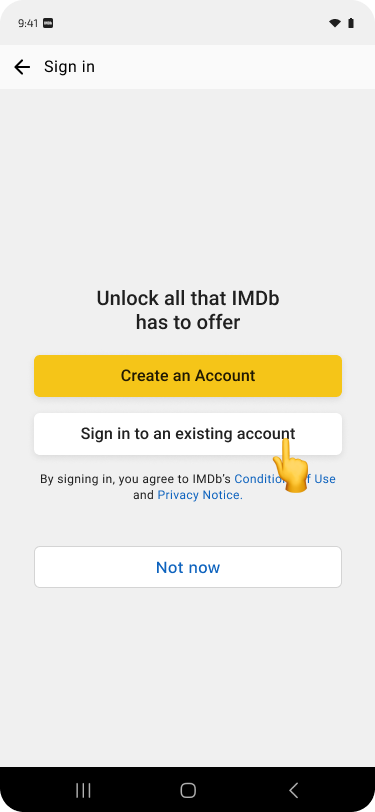
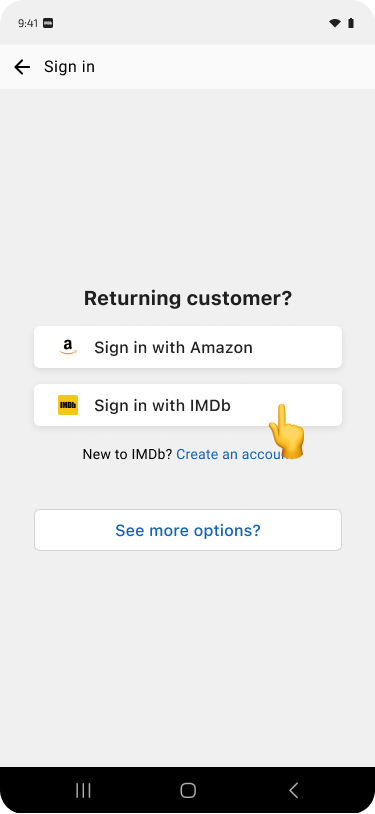
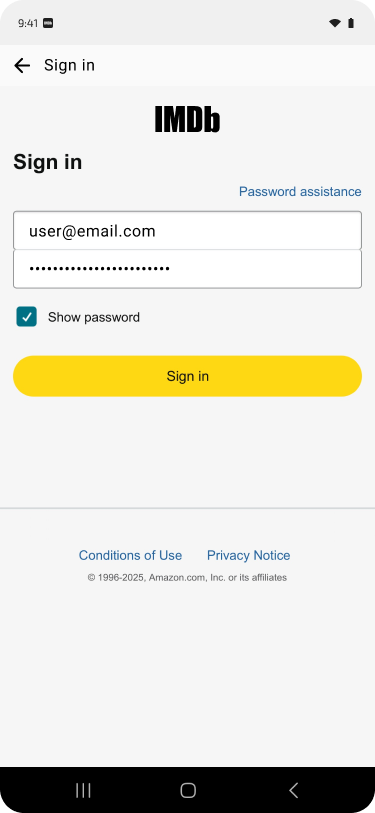
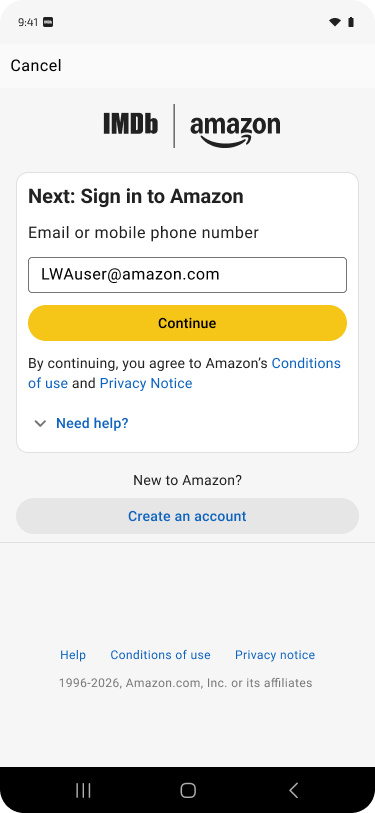
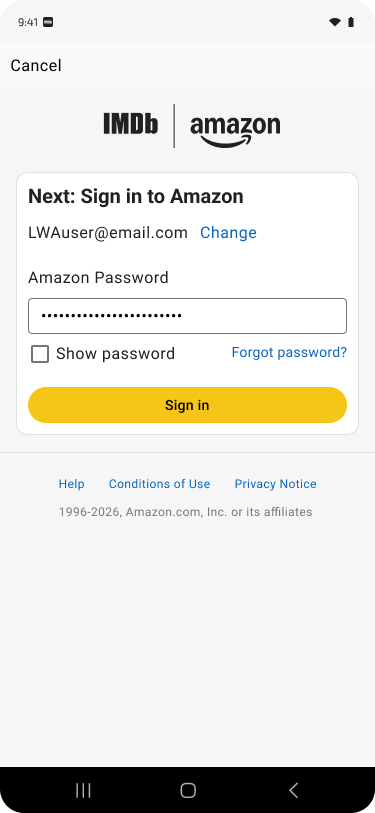
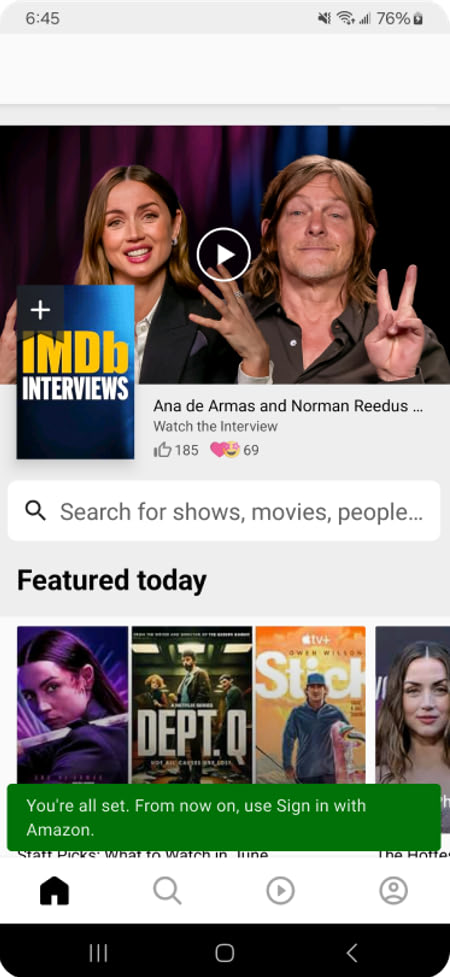
- On your IMDb Android app, Sign in to your existing IMDb account.
- Select Sign in with IMDb.
- Enter your IMDb account credentials.
- Migrate your account to Amazon? Next: Sign in to Amazon.
- Use your Amazon account email and password.
- You're all set. From now on, use Sign in with Amazon.
If you see that your Amazon account is already in use with another IMDb account, you'll have to continue with the IMDb account you've just signed in with. If you still want to migrate, try a different Amazon email address. You can do this from your IMDb Account Settings. If you're still experiencing issues migrating, or you can't sign in to IMDb to access your Account Settings, please Contact Us.
I sign in with Google or Apple
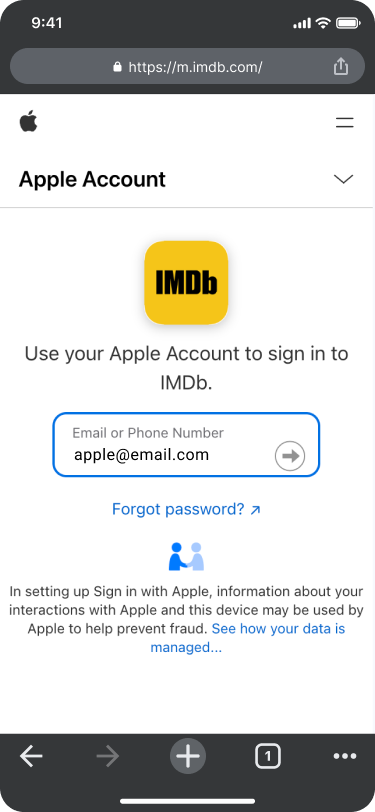
If you sign in to IMDb with Google or Apple, we recommend migrating your account to sign in with Amazon. The steps to complete migration can be seen and are listed below.
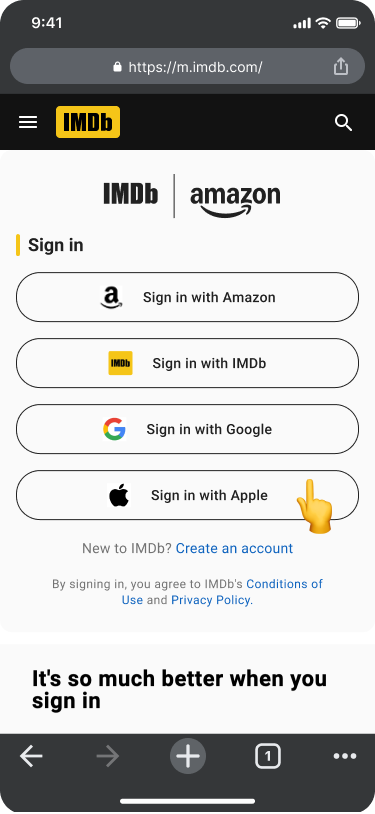


(Example screenshots are for the Apple experience, these steps will be the same for Google linked IMDb accounts)
If your IMDb account is linked to Google or Apple:
- Select Sign in with Google or Apple (whichever you normally use to sign into IMDb)
- Enter your Google or Apple credentials.
- We'll ask you to sign in to IMDb with your Amazon account.
- Sign in with your Google or Apple details to confirm it's you.
- Then sign in to (or create) an Amazon account to link your IMDb account and data.
- You're all set. From now on, use Sign in with Amazon.
I'm new to IMDb
If you're new to IMDb and an Amazon account already matches the email you're using to create an account, you'll be asked to sign in to IMDb with your existing Amazon account. There's no need to create a new Amazon account.
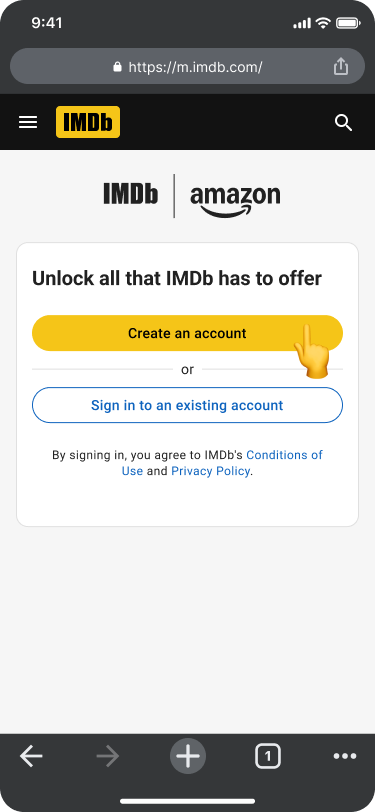
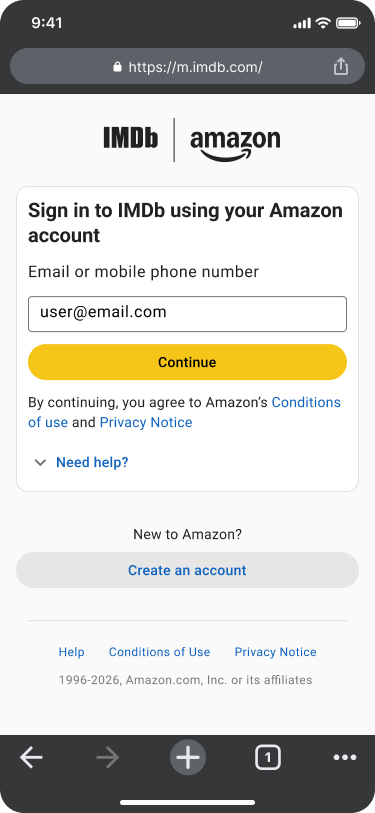
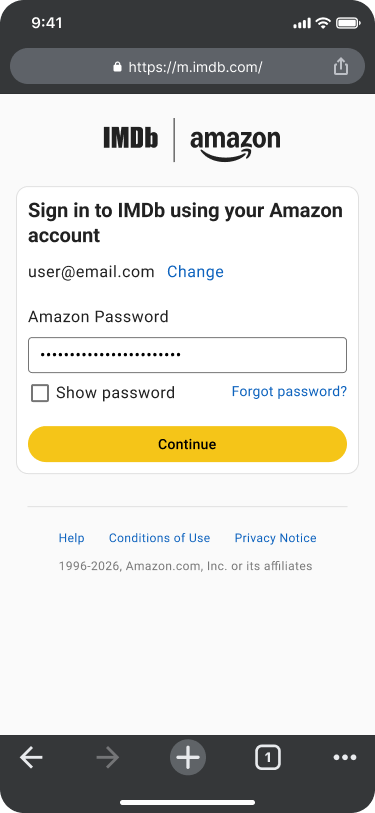
If you're not actually new to IMDb, and already have an account, the next screen will let you know and ask you to sign in before migrating your IMDb account to Amazon.
If you're new to Amazon, use the grey "Create an account" button in the above center screenshot, and create an account. Going forward, use those details to sign in to IMDb.
Migrate via IMDb Account Settings
You can always migrate your IMDb account to Amazon via your Account Settings. Check out the screenshots below for steps.

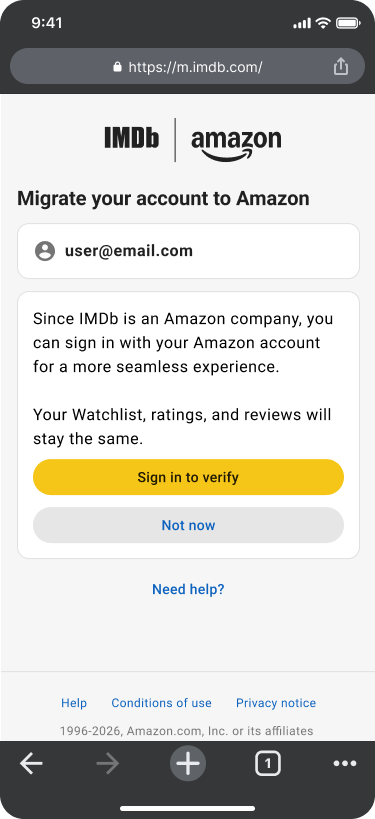
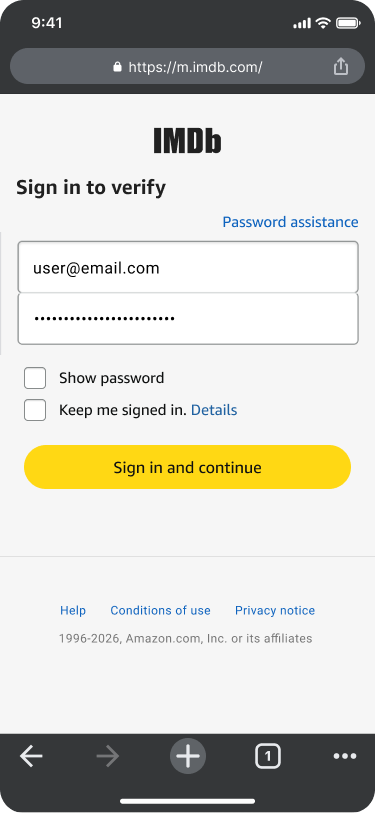
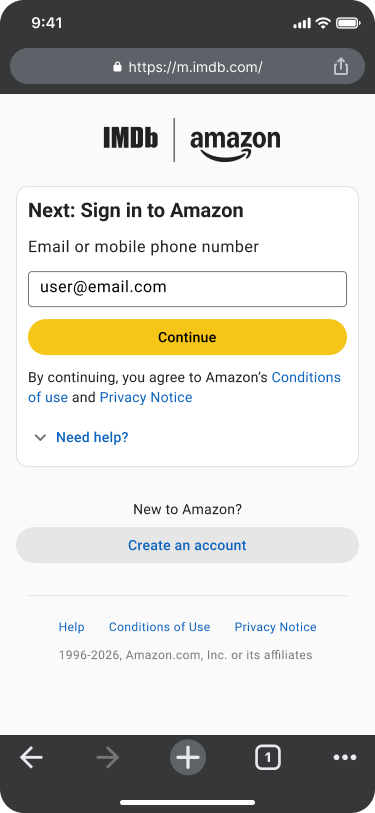
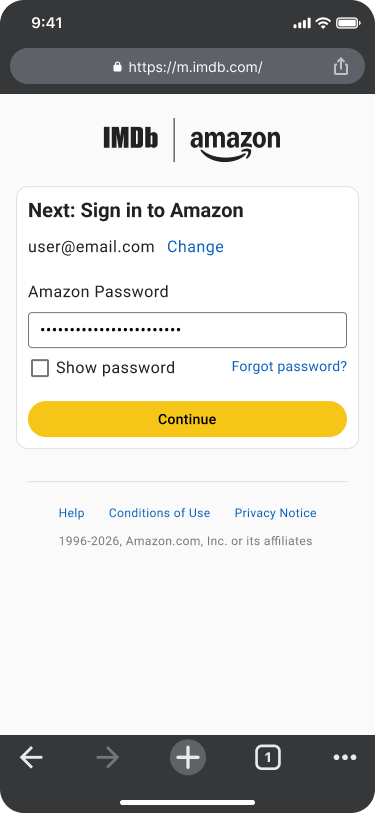
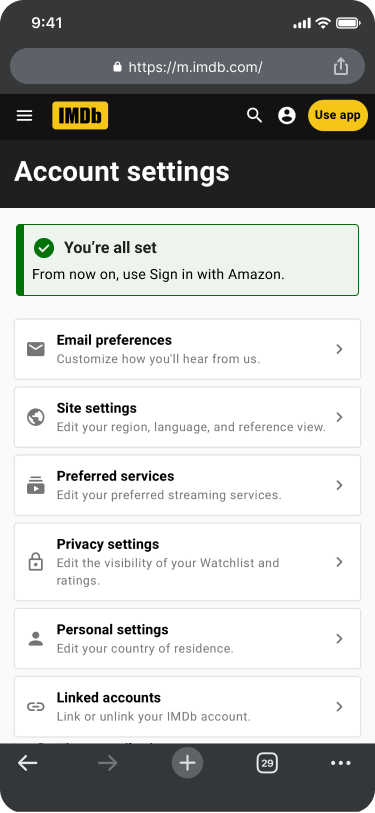
If you're still experiencing issues migrating, or you can't sign in to IMDb to access your Account Settings, please Contact Us.
- If you're signed in with Amazon on IMDb, manage your account email, mobile number, and password (with Two-Step Verification) by visiting the Amazon account settings page: Amazon.com > Account & Lists > Account > Login & security.
- If you're signed in with IMDb, manage your account email/password by visiting the IMDb Account Settings page.
⚠️ Important
Deleting your Amazon account also deletes your IMDb and IMDbPro account, and all associated data. This includes any active IMDbPro membership.
Related help (quick links)
- Forgotten your email address/password?
- Change your email address/password
- How can I access or delete personal information IMDb stores about me?
- Deleting your IMDb account
- Requesting your IMDb account data
- IMDb Single Sign-On with Amazon
- Sign-in issues
- Browser Redirecting Issue
- Why should I register with IMDb?
- Using your Amazon account for IMDbPro
- Japan based Amazon accounts
- China based Amazon accounts
- Need more help? Contact us
About IMDb & Amazon
IMDb is an Amazon company and was acquired in 1998.