- Use your Amazon account for IMDbPro
- How can I join IMDbPro?
- What is IMDbPro?
- How do I update my IMDbPro account settings?
- I've forgotten my email address/password. How do I sign in to IMDbPro?
- How do I cancel my IMDbPro membership?
- What happens when I cancel or downgrade my IMDbPro membership?
- How do I update my credit card?
- IMDbPro Premium Subscription free trial: How to get started
- What payment methods are accepted for IMDbPro?
- How do I update my billing address?
- How much does IMDbPro cost?
- How do I apply a promo code when joining IMDbPro?
- Where can I confirm my next billing date?
- How do I update my membership plan?
- What is a group plan membership?
- How do I join a group plan?
- IMDbPro Business Accounts
- Why does it say my membership is suspended when I log into IMDbPro?
- How do I renew my membership?
- Billing FAQ
- I tried all your suggestions, but can't join IMDbPro. What should I do?
- I didn't sign up for IMDbPro. Why was I charged?
- Why did you update my card?
- How can I try IMDbPro before paying?
- Why do I need to select a payment plan when joining IMDbPro?
- Discounts for IMDbPro Affiliates
- How do I update my email address/password for IMDbPro?
- Why am I told that my email is not valid for IMDbPro?
- How do I update my Amazon password?
- How do I update my IMDbPro email preferences?
- How do I obtain a receipt for IMDbPro?
- How is my estimated tax calculated?
- Which states in the US are charged Sales Tax & how is it calculated?
- Which countries outside of the US are charged Tax?
- Former IMDbPro member with billing questions?
- IMDbPro's ACTRA Member Offer
- IMDbPro's SAG-AFTRA Member Offer
- Special Offers
- IMDbPro Promo Offer
Use your Amazon account for IMDbPro
Updated 29-October-2026
IMDb is an Amazon company. This article explains how IMDbPro uses Amazon's account system, and how you, as an Amazon customer, may be signed in to IMDb with your Amazon account. Already using "Sign in with Amazon" to access IMDb? You're all set. Keep signing in the same way!
Contents
- What's new
- Why we're making this update
- Sign in with Amazon on IMDbPro
- Account management
- Account sign-in options
- Related help (quick links)
What's new
IMDbPro uses Amazon's account system for sign in and new account creation. If you're an existing IMDbPro Premium member who signs in with IMDb, you can now update your account to use Amazon sign-in. This is optional, and you can do it whenever you like from your Account Settings page on IMDbPro.
What isn't changing:
- Your IMDbPro membership continues. Your account, IMDb Name page, and display settings stay the same.
- If you use Amazon to sign in to IMDbPro, keep signing in the same way.
- If you use your IMDb email and password to sign in, you'll continue to see that option until you choose to update your account.
When using your Amazon account to sign in to IMDbPro, if you decide to delete your Amazon account, your IMDbPro account (and related settings) will be deleted too.
Why we're making this update
- Consistency: The same sign-in and account across Amazon, IMDb, and IMDbPro.
- Simplicity: Fewer credentials to manage; you can use your existing Amazon account.
Sign in with Amazon on IMDbPro
If you're an active IMDbPro Premium member who currently signs in with your IMDb email and password, you can update your account to use your Amazon login for IMDbPro.
Here's what to expect:
- Sign in to IMDbPro with your IMDb email and password.
- Go to your Account Settings.
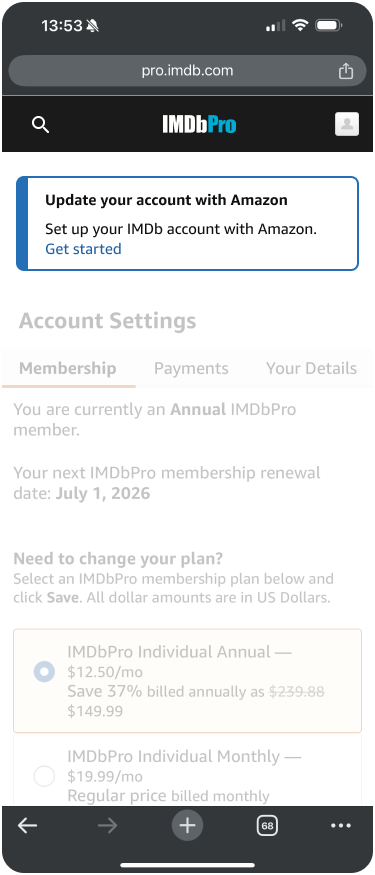
- Select Get started on "Update your account with Amazon" banner.
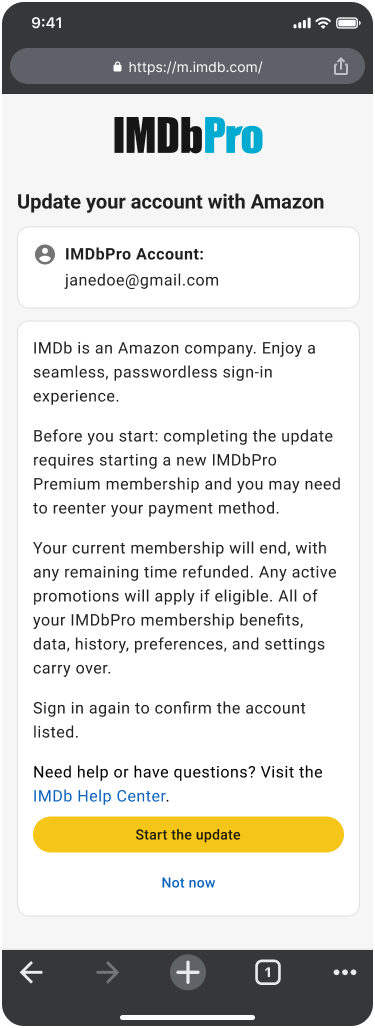
- Select Verify to start the update.
- Confirm your IMDb login.
- Sign in with your Amazon account, or create a new one.
- Select Continue on the confirmation screen.
- Choose your membership plan, add a payment method, then select Purchase and complete update (you are not making a secondary payment on top of your existing subscription).
- You'll land on your Account Settings page with a success confirmation.
Good to know:
- This update is available on desktop and mobile web at pro.imdb.com.
- Your IMDbPro membership, Name page, and display settings carry over.
- If you have an active promotional offer, it carries over automatically.
- You won't receive a new free trial.
- You'll have to re-enter your payment method as part of the update.
- Once you update to Amazon sign-in, this change is permanent.
- IMDbPro Business account members won't need to complete the checkout/payment step. After confirming your Amazon account, you'll go straight to the success confirmation.
Account management
- If you're signed in with Amazon on IMDb, manage your account email, mobile number, and password on Amazon (with Two-Step Verification) by visiting the Amazon account settings page: Amazon.com > Account & Lists > Account > Login & security.
- If you're signed in with IMDb, manage your account email and password by visiting the IMDb account settings page.
- If you're signed in to IMDb with your Amazon account, deleting your Amazon account also deletes your IMDb and IMDbPro accounts, and all associated data. This includes any active IMDbPro memberships.
Account sign-in options
Depending on your existing IMDbPro membership or sign-in type, you might see messages about account updates or alternative ways to sign in.
- "Update your account with Amazon" banner: If you're an active IMDbPro Premium member who signs in with IMDb, you'll find this banner on your Account Settings page. Select Get started to begin updating your account to Amazon sign-in.
- "Update your account with Amazon" at sign-in: If your IMDb account is already linked to an Amazon account, your sign-in experience stays the same. Just click Continue to sign in with your Amazon account. Otherwise, select Verify to start the update to get started.
Related help (quick links)
- Using your Amazon account on IMDb
- How do I update my IMDbPro account settings?
- Forgotten email/password?
- Change your email/password
- Why am I told that my email is not valid for IMDbPro?
- How can I access or delete personal information IMDb stores about me?
- Deleting your IMDb account
- Requesting your IMDb account data
- IMDb Single Sign-On with Amazon
- Sign-in issues
- Browser Redirecting Issue
- Japan based Amazon accounts
- China based Amazon accounts
- Need more help? Contact us
About IMDb & Amazon
IMDb is an Amazon company and was acquired in 1998.